PSeInt pseudocode online, in your browser
Codoritmo is a free pseudocode editor that runs in your browser and understands PSeInt's syntax: Algoritmo, Definir, Leer, Escribir, Si, Mientras, Para and the rest. Open the page, write your algorithm and run it, with nothing to install and no account to create.
Opens the same program as the screenshot, ready to run.
What a running program looks like
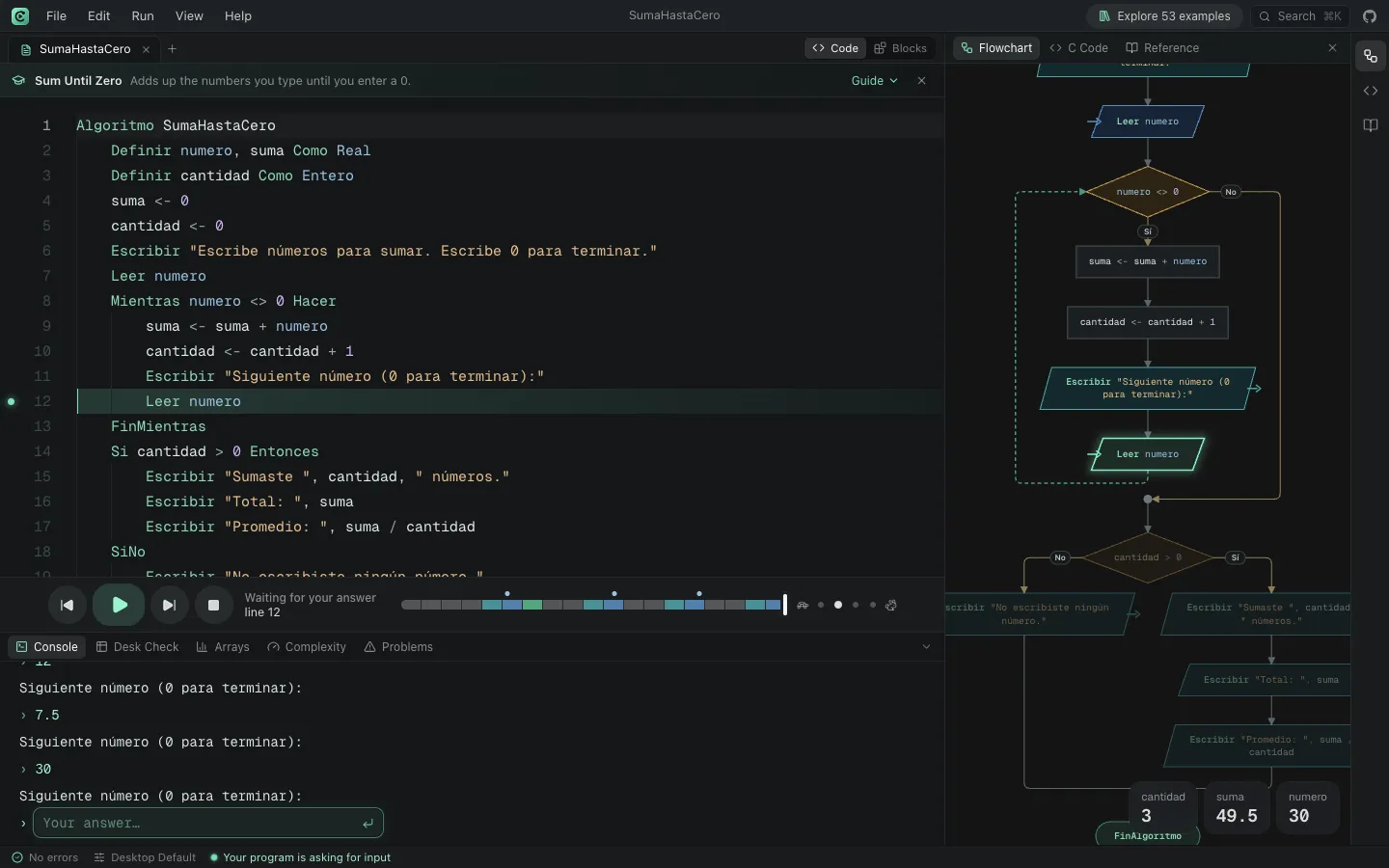
A real Codoritmo screenshot of the “Sum Until Zero” example, paused on line 12 while it waits for the next number. The answers so far were 12, 7.5 and 30: the code marks the current line, the flowchart lights up the same block and the variables show suma = 49.5.
How to run your pseudocode in Codoritmo
Open the workspace
It works in any modern browser. The first time it opens with an example; the + button starts a blank tab.
Pick your course's profile
In the bottom bar, the language profile lets you choose among 463 school profiles that come from PSeInt. A profile sets rules such as whether arrays start at 0 or 1, or whether variables must be defined.
Write or paste your algorithm
The editor highlights the syntax, suggests keywords and flags errors as you type, with the line and an explanation.
Run it or step through it
Press Run, or use Step Forward and Step Back to go through it line by line. When the program asks for a value with Leer, you type it in the console.
Save or share
Your tabs are kept in this browser. Save downloads a .psc file, and the share link opens your algorithm exactly as it is.
Opens the same program as the screenshot, ready to run.
What comes with the editor
Codoritmo draws your algorithm's flowchart and animates it as it runs, fills a trace table with every variable's value at each step, shows your arrays as boxes that change, measures your algorithm's complexity and translates the pseudocode to C, C++, Java, Python or JavaScript.
It includes 53 solved examples, from “Hello world” to sorting algorithms and games, and a language reference that explains every instruction.
Codoritmo and PSeInt desktop
PSeInt is the original tool and remains the reference. Here is what changes if you use Codoritmo.
What Codoritmo adds
- It runs in the browser with nothing to install, so it works on lab computers, Chromebooks or anywhere you can't install software.
- You can step backwards, not only forwards, and jump to any moment of the run from the timeline.
- The trace table fills itself in with every variable.
- You can share an algorithm with a link.
- A blocks mode, an array visualiser and complexity measurement.
- As in PSeInt, you can build and edit the program from the flowchart, view Nassi-Shneiderman diagrams, evaluate expressions while paused, use predefined input lists and export to C#, PHP, Pascal, Visual Basic, QBasic, MatLab and HTML.
What PSeInt desktop does that Codoritmo doesn't yet
- It works offline, as an installed program for Windows, macOS and Linux.
- It is the official tool: if your course grades with PSeInt, test your final submission there. Codoritmo follows its syntax closely, but isn't identical in every case.
Codoritmo is an independent project, inspired by PSeInt and compatible with its syntax and school profiles. It is not PSeInt and is not affiliated with it. Official PSeInt website
Frequently asked questions
Is Codoritmo PSeInt?
No. Codoritmo is an independent project, inspired by PSeInt and compatible with its syntax and school profiles. It is not affiliated with PSeInt. The official program is available from the PSeInt website.
Is it free? Do I need an account?
It is free and open source (GPL v2 or later), and you don't need an account. Your tabs are kept in the browser you use; to move to another computer, download your .psc file or share the link.
Can I open my .psc files?
Yes. File › Open… loads a .psc or .txt file from your computer, and Save downloads it again as .psc.
Will my PSeInt program behave the same?
For class exercises it usually does: Codoritmo understands the same syntax and follows the profile you choose. There can be differences in unusual cases; if you find one, you can report it in the project's repository.
Examples to try
Solved programs, each with its code, its flowchart and a sample run.
Sum Until Zero
Adds up the numbers you type until you enter a 0.
BeginnerHello World
Your first algorithm: print a couple of messages on screen.
BeginnerGuess the Number
Guess a secret number from 1 to 100 in seven tries.
IntermediateBubble Sort
Sorts random numbers by swapping neighbors, and stops as soon as they're in order.
Intermediate
More Codoritmo tools
- PSeInt alternativeAn honest comparison of Codoritmo and PSeInt desktop.
- Online flowchart makerYour algorithm's flowchart, generated from the code and animated as it runs.
- Trace tablesA table of every variable's value at each step, filled in while the program runs.
- Pseudocode to PythonYour algorithm translated into a Python program you can run.
- Pseudocode to CYour algorithm translated into a C (or C++) program ready to compile.
- Pseudocode to JavaYour algorithm translated into a Java class with a main method.
- Block-based programmingBuild your algorithm with Scratch-like blocks and see the pseudocode they write.