Program with blocks and see the pseudocode
In Blocks mode you build your algorithm by dragging coloured pieces, as in Scratch, but each block shows the PSeInt instruction it writes: Escribir, Leer, Si, Para. You learn the logic without fighting the syntax, and when you switch back to code it's already written.
Opens the program in Codoritmo; press Blocks above the editor.
An algorithm in blocks
A real screenshot of the “Times Table” example in Blocks mode. On the right, the same program's flowchart; below, the pseudocode those blocks produce.
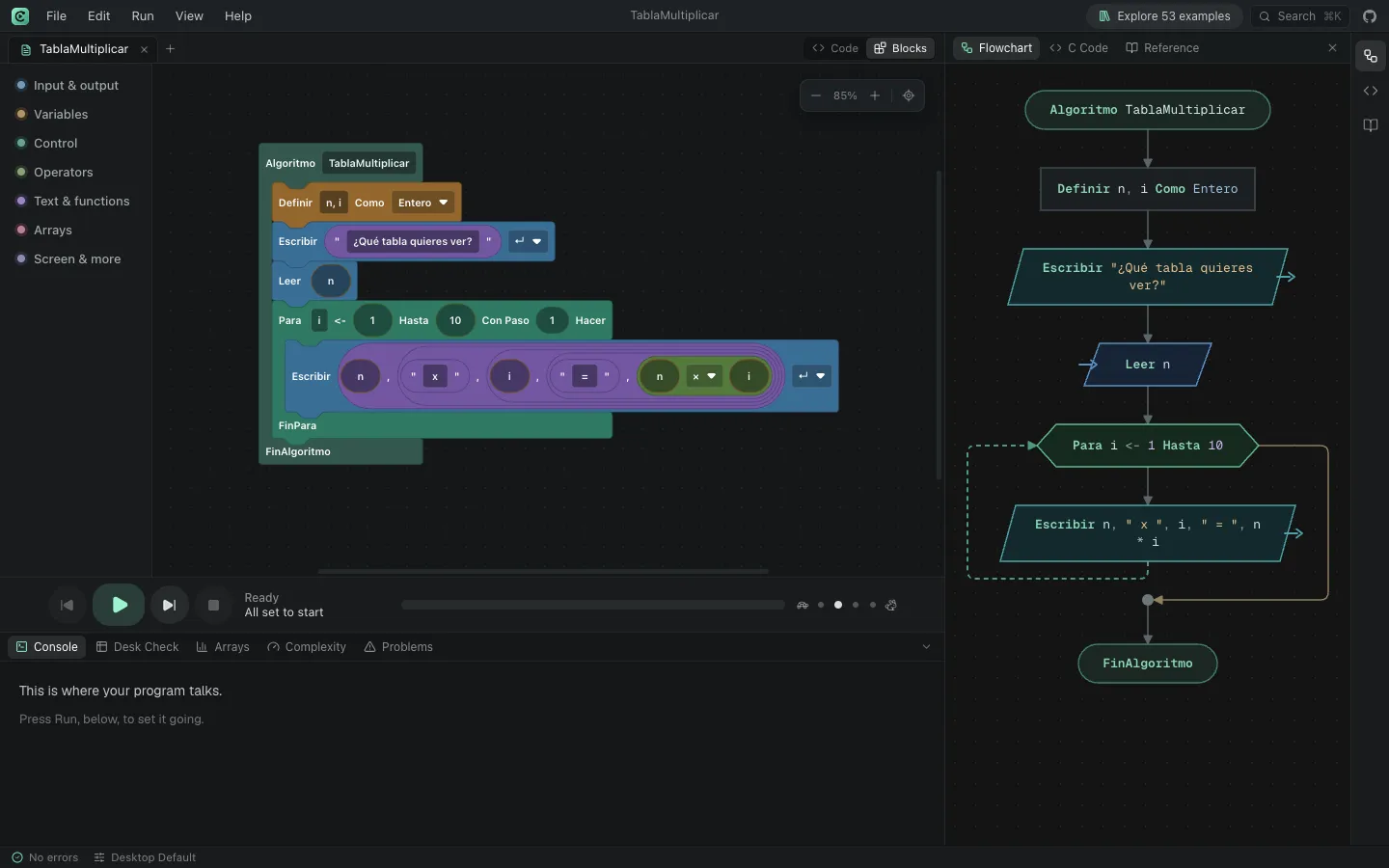
The pseudocode those blocks write
Algoritmo TablaMultiplicar Definir n, i Como Entero Escribir "¿Qué tabla quieres ver?" Leer n Para i <- 1 Hasta 10 Hacer Escribir n, " x ", i, " = ", n * i FinParaFinAlgoritmoHow to program with blocks in Codoritmo
Switch to Blocks
Above the editor, the Code / Blocks switch changes the view. If you already had code, it turns into blocks.
Drag from the categories
Input & output, Variables, Control, Operators, Text & functions, Arrays, and Screen & more. Snap each block under the previous one.
Move one or many
Dragging a block takes the ones below it along, as in Scratch. To move just one, hold Ctrl (⌘ on a Mac) while you drag it.
Run it and see the code
Run works just as in the code view. Switch back to Code to see or edit the pseudocode.
Opens the program in Codoritmo; press Blocks above the editor.
Blocks and code, both ways
You can start in blocks and finish in code, or the other way round. Anything without its own block is kept as a code block holding the exact text, so converting loses nothing but comments.
Code with syntax errors can't be turned into blocks: fix them in the code view and try again.
Codoritmo and PSeInt desktop
PSeInt has no blocks mode, but it offers other writing aids.
What Codoritmo adds
- A Scratch-like blocks mode, linked to the code both ways.
- The flowchart updates as you assemble the blocks.
What PSeInt desktop does that Codoritmo doesn't yet
- Its commands panel inserts a template of each instruction into the code.
- It works offline, as an installed program.
Codoritmo is an independent project, inspired by PSeInt and compatible with its syntax and school profiles. It is not PSeInt and is not affiliated with it. Official PSeInt website
Frequently asked questions
Is it the same as Scratch?
It works the same way, dragging and snapping, but the blocks are pseudocode instructions rather than animations. The point is to move from blocks to the pseudocode your class asks for.
Do I lose my code if I switch to blocks?
No instruction is lost: anything without its own block stays as a code block. The only thing lost is comments (//).
Are the blocks in Spanish?
The instructions on the blocks use PSeInt's Spanish keywords in every language, so they match the code. The category names follow the page's language.
Examples to try
Solved programs, each with its code, its flowchart and a sample run.
Times Table
Prints the multiplication table for the number you choose.
BeginnerPersonal Greeting
Asks for your name and age, and answers with both.
BeginnerCan I Vote?
Tells you whether you can vote or how many years you have left.
BeginnerCountdown
A rocket launch countdown that ticks second by second.
Beginner
More Codoritmo tools
- PSeInt onlineWrite and run pseudocode with PSeInt's syntax from your browser.
- PSeInt alternativeAn honest comparison of Codoritmo and PSeInt desktop.
- Online flowchart makerYour algorithm's flowchart, generated from the code and animated as it runs.
- Trace tablesA table of every variable's value at each step, filled in while the program runs.
- Pseudocode to PythonYour algorithm translated into a Python program you can run.
- Pseudocode to CYour algorithm translated into a C (or C++) program ready to compile.
- Pseudocode to JavaYour algorithm translated into a Java class with a main method.