A PSeInt alternative that runs in the browser
If you use PSeInt but need to work where you can't install software, or want more tools to understand your algorithm, Codoritmo is an option. It is independent, free, open source and understands the same pseudocode. This page compares the two, including what PSeInt still does that Codoritmo doesn't.
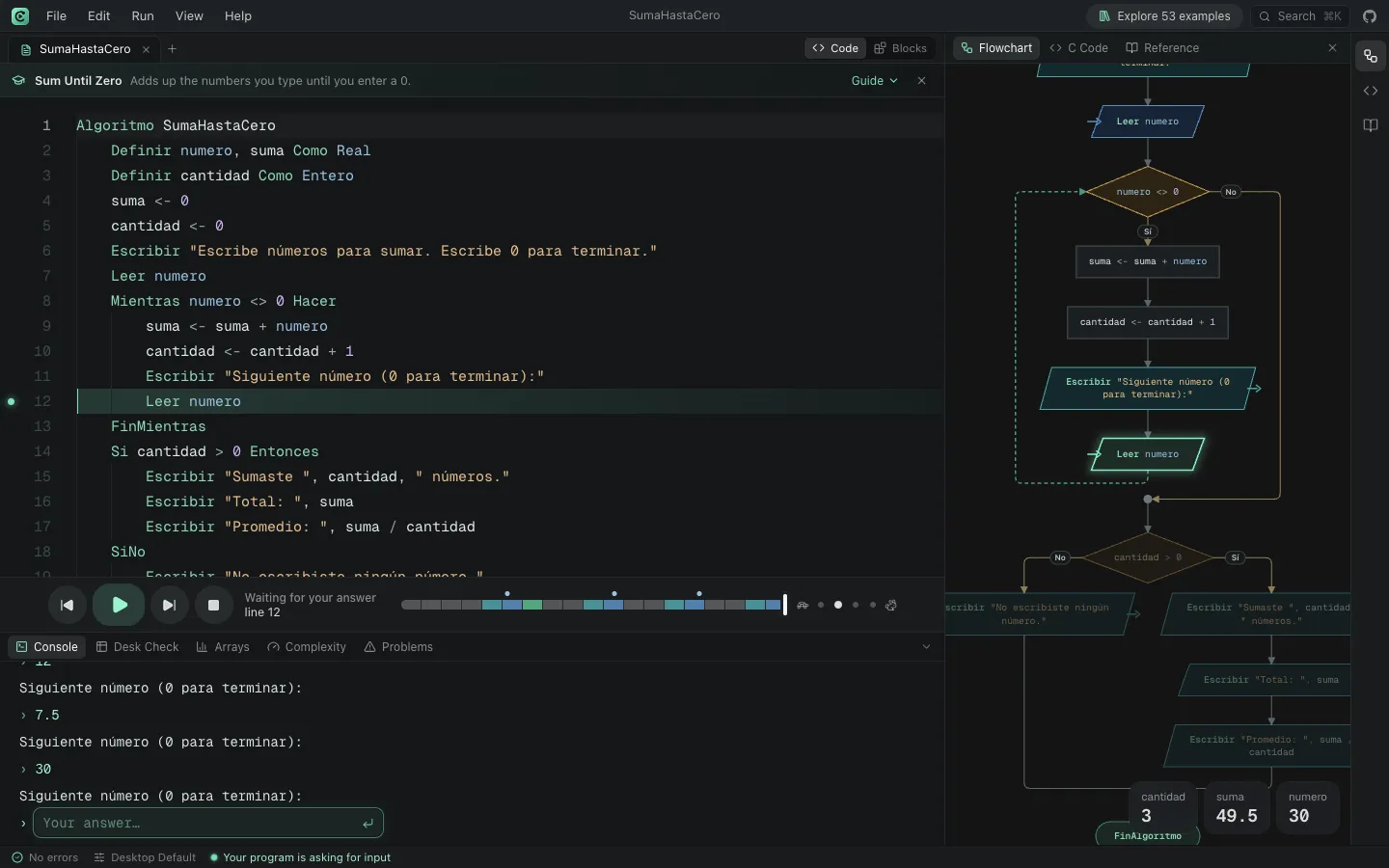
Opens an example program, ready to step through.
Codoritmo and PSeInt desktop, point by point
A comparison based on what Codoritmo's code does today and what the desktop version of PSeInt offers.
| Feature | Codoritmo | PSeInt desktop |
|---|---|---|
| Installation | None: it opens in the browser | A program for Windows, macOS and Linux |
| Offline | No: it opens from the web | Yes |
| Syntax | PSeInt's | The original |
| School profiles | PSeInt's 463, with adjustable rules | Its own, with adjustable rules |
| Step-by-step runs | Forwards and backwards, with a timeline | Forwards |
| Trace table (desk check) | Automatic, with every variable | You choose which variables or expressions to follow |
| Evaluate an expression while paused | Yes, at any step, also when stepping back | Yes |
| Flowchart | Generated from the code, animated as it runs, and editable too: you can build the program from the diagram | Generated, and editable too: you can build the program from the diagram |
| Nassi-Shneiderman (Chapin) diagrams and alternative input/output shapes | Yes | Yes |
| Predefined input lists | Yes, saved to and loaded from a .txt file | Yes, saved to and loaded from a file |
| Flowchart export | PNG and SVG | Image, and SVG in recent versions |
| Scratch-like blocks | Yes, linked to the code both ways | No |
| Translate to other languages | C, C++, Java, Python, JavaScript, C#, PHP, Pascal, Visual Basic, QBasic, MatLab and HTML | The same languages |
| Arrays and complexity | Array visualiser and big-O measurement | Not included |
| Sharing | A link that opens your algorithm | The .psc file |
| License | Open source, GPL v2 or later | Open source, GPL v2 |
Codoritmo is an independent project, inspired by PSeInt and compatible with its syntax and school profiles. It is not PSeInt and is not affiliated with it. Official PSeInt website
How to move from PSeInt to Codoritmo
Open Codoritmo
There is nothing to install. Your tabs are kept in the browser.
Pick the same profile
In the language profile, look up your school among the 463 profiles that come from PSeInt, or keep the default.
Open your file
File › Open… loads your .psc exactly as PSeInt saved it, or paste the code into a new tab.
Run it and compare
Step through it and check the console. If something behaves differently from PSeInt, the Problems panel points to the line.
Opens an example program, ready to step through.
When to use which
Use PSeInt if your teacher requires it for submissions or if you need to work offline.
Use Codoritmo if you're on a computer where you can't install software, if you want to watch your algorithm run forwards and backwards, or if you're moving from pseudocode to Python, C or Java.
You can also use both: a .psc file opens in either.
Frequently asked questions
Does Codoritmo replace PSeInt?
It doesn't try to. PSeInt is the original tool and Codoritmo is inspired by it. Codoritmo is another way to write the same pseudocode, built for the browser.
Can I open PSeInt files in Codoritmo?
Yes. .psc files are plain text: open them with File › Open… and save them again as .psc to carry on in PSeInt if you like.
Does it have the same profiles as PSeInt?
It includes the 463 school profiles that ship with PSeInt, with their names and rules, plus general profiles such as Flexible and Strict. You can also adjust each rule by hand.
Who makes Codoritmo?
It is an independent open-source project with no connection to the PSeInt team. The code is published on GitHub and anyone can review it or suggest changes.
Examples to try
Solved programs, each with its code, its flowchart and a sample run.
Sum Until Zero
Adds up the numbers you type until you enter a 0.
BeginnerCan I Vote?
Tells you whether you can vote or how many years you have left.
BeginnerBinary Search
Finds a value in a sorted array by halving the range every step.
IntermediateTowers of Hanoi
Solves the classic tower puzzle step by step.
Advanced
More Codoritmo tools
- PSeInt onlineWrite and run pseudocode with PSeInt's syntax from your browser.
- Online flowchart makerYour algorithm's flowchart, generated from the code and animated as it runs.
- Trace tablesA table of every variable's value at each step, filled in while the program runs.
- Pseudocode to PythonYour algorithm translated into a Python program you can run.
- Pseudocode to CYour algorithm translated into a C (or C++) program ready to compile.
- Pseudocode to JavaYour algorithm translated into a Java class with a main method.
- Block-based programmingBuild your algorithm with Scratch-like blocks and see the pseudocode they write.